


ASUS ROG Flow Z13 Review: Power in Your Palm
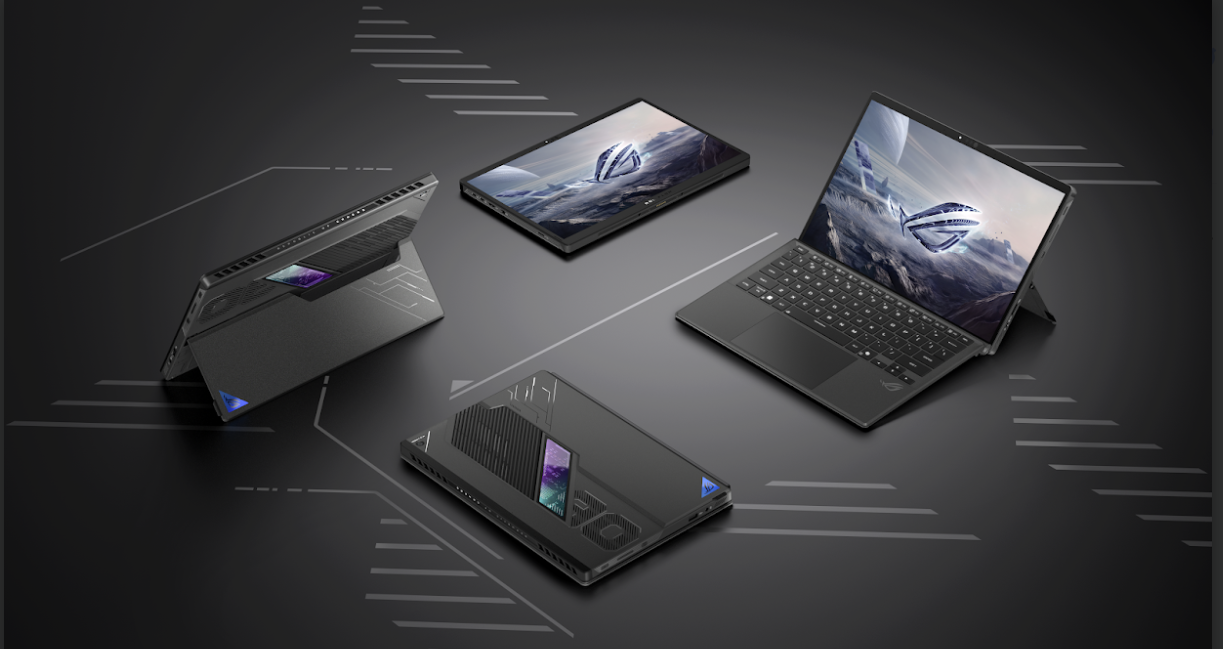
If someone had told you five years ago that a 13-inch tablet could run demanding games and local AI models with 70 billion parameters, you'd have laughed them out of the room. Yet here we are. The ASUS ROG Flow Z13 has quietly become one of the most talked-about machines in the 2-in-1 category, blurring the line between a gaming laptop, a creative workstation, and a genuinely portable tablet.
This article breaks down what makes the Flow Z13 tick, how it performs in the real world, and where it fits compared to two very different competitors: the business-focused Lenovo ThinkPad X1 Carbon Gen 13 and the ever-popular Microsoft Surface Pro. By the end, you'll know exactly who this machine is for and who should look elsewhere.
What Is the ASUS ROG Flow Z13?
The ROG Flow Z13 is ASUS's answer to a simple but ambitious question: can a tablet replace a gaming laptop? Unlike traditional convertibles that compromise on power to save weight, the Flow Z13 packs desktop-class silicon into a 13.4-inch chassis with a detachable keyboard and a 170-degree kickstand.
The star of the current generation is the AMD Ryzen AI Max+ 395 processor, built on 16 Zen 5 CPU cores paired with Radeon 8060S graphics. What makes this chip unusual is its unified quad-channel memory architecture, which lets the CPU and GPU share the same pool of RAM. That design choice is the secret behind performance ASUS describes as comparable to a dedicated discrete GPU, all while fitting inside a tablet you can hold in one hand.
Key Specifications at a Glance
-
Processor: AMD Ryzen AI Max+ 395 (16 cores, up to 5.1GHz, 80MB cache) or the slightly lower-tier Ryzen AI Max 390 (12 cores)
-
Graphics: Radeon 8060S with RDNA 3.5 architecture
-
Memory: LPDDR5X-8000 unified memory, configurable up to 128GB
-
Display: 13.4-inch WQXGA (2.5K) ROG Nebula touchscreen, 180Hz refresh rate, 100% DCI-P3 coverage, Pantone validated
-
Storage: Up to 2TB PCIe Gen 4 SSD
-
Battery: 70Wh
-
Build: CNC-machined aluminum chassis with a stainless steel vapor chamber and liquid metal thermal compound
-
Connectivity: Wi-Fi 7, Bluetooth 5.4, USB4
These numbers alone put the Flow Z13 in rare company. Very few tablets or even ultrabooks offer this combination of raw compute power and portability.
Design and Build Quality
ASUS didn't just cram gaming hardware into a tablet shell; the entire chassis was engineered around thermal efficiency. The stainless steel vapor chamber and second-generation Arc Flow Fans keep the system cool under sustained load, while the liquid metal thermal compound helps the CPU sustain higher clock speeds without throttling as aggressively as you'd expect from a device this thin.
The kickstand deserves a special mention. Its 170-degree range of motion means you can angle the screen almost flat for drawing or upright for typing, something rigid tablets like the iPad Pro simply can't match. Combined with a large touchpad and keycaps on the detachable keyboard, typing feels closer to a full laptop experience than most 2-in-1s manage.
Display Quality
The 2.5K ROG Nebula display is genuinely one of the best screens in this category. At 180Hz with full DCI-P3 coverage, it's fast enough for competitive gaming and accurate enough for color-sensitive creative work like video editing or photo retouching. Pantone validation adds an extra layer of credibility for professionals who need color accuracy they can trust without third-party calibration tools.
Performance: Gaming, Creative Work, and Local AI
Gaming Performance
Thanks to the Radeon 8060S GPU and unified memory pool, the Flow Z13 handles modern AAA titles at 2.5K resolution with playable frame rates when settings are tuned appropriately. It won't outmuscle a desktop RTX-class rig, but for a 13-inch tablet, the numbers are frankly startling. Esports titles and lighter AAA games run comfortably at high settings, while heavier titles benefit from the device's ability to dynamically balance CPU and GPU workloads through its shared memory architecture.
Creative Workloads
Video editors and 3D artists will appreciate the combination of a color-accurate display and genuinely capable GPU compute. Rendering and export tasks that would choke a typical ultrabook run noticeably faster here, though thermal throttling can become a factor during extended, demanding sessions a fair trade-off given the compact form factor.
Local AI: The Real Differentiator
Perhaps the most unique selling point of the Flow Z13 is its ability to run large language models locally. With the 128GB memory configuration, the unified architecture allows the system to run models with up to 70 billion parameters directly on the device no cloud connection required. This matters for privacy-conscious professionals, developers experimenting with local AI tooling, or anyone who wants AI assistance without sending data to external servers. ASUS's own Virtual Assistant software, exclusive to Ryzen AI 300-series laptops, leverages this local processing for document summarization, voice transcription, and contextual chat support.
Battery Life and Portability
A 70Wh battery in a device this powerful is always going to involve trade-offs. Expect solid all-day battery life for productivity tasks like writing, browsing, and video calls, but gaming or AI workloads will drain the battery considerably faster. This is typical of high-performance 2-in-1s and shouldn't be a dealbreaker if you understand the use case going in.
Weight-wise, the tablet itself remains impressively light for what's under the hood, though adding the keyboard attachment brings it closer to a traditional ultrabook's heft.
ASUS ROG Flow Z13 vs. Lenovo ThinkPad X1 Carbon Gen 13
These two machines serve fundamentally different audiences, but comparing them highlights what each does best.
The Lenovo ThinkPad X1 Carbon Gen 13 is built for business travelers who prioritize reliability, security, and weight over raw performance. It typically ships with Intel Core Ultra processors, a carbon-fiber and magnesium chassis weighing under 1kg, and enterprise-grade security features like a discrete TPM 2.0 chip, FIDO authentication, and ThinkShield protection. Its 14-inch 2.8K OLED display and legendary keyboard make it a favorite among professionals who type for a living.
Where the ThinkPad wins:
-
Significantly lighter (under 1kg vs. a tablet-plus-keyboard combo)
-
Best-in-class keyboard for long typing sessions
-
Enterprise security and manageability features
-
Longer battery life for pure productivity use
Where the Flow Z13 wins:
-
Dramatically stronger GPU performance for gaming and creative rendering
-
Local AI processing at a scale the ThinkPad's integrated graphics can't match
-
More versatile form factor (tablet, laptop, and creative sketchpad in one)
-
Higher refresh rate, color-accurate touchscreen
In short: choose the ThinkPad if your priority is a lightweight business companion with unmatched typing comfort. Choose the Flow Z13 if you want a device that can genuinely game, render, and run AI workloads on the go.
ASUS ROG Flow Z13 vs. Microsoft Surface Pro
The Microsoft Surface Pro remains the most recognizable name in the detachable 2-in-1 space, and its latest generation brings Snapdragon X2 processors, an optional OLED PixelSense display, and improved battery life. It's an excellent all-rounder for note-taking, sketching, and everyday productivity, especially for users embedded in the Windows and Microsoft 365 ecosystem.
However, the Surface Pro's ARM-based Snapdragon chips, while power-efficient, aren't built for demanding gaming or heavy local AI inference the way the Flow Z13's Ryzen AI Max+ architecture is. The Surface Pro is the better choice for students, note-takers, and casual creatives who value battery life and a thinner design. The Flow Z13 is the better choice for anyone who wants console-adjacent gaming performance and workstation-level compute in a similarly portable shell.
Real-World Use Case: Who Should Actually Buy This?
Consider a freelance 3D artist who travels frequently between client meetings and needs to render previews on the road, jump into a quick multiplayer session to unwind, and occasionally run a local AI model to keep sensitive client data off external servers. That's precisely the profile the Flow Z13 was engineered for. It's not the best choice for someone who just wants a lightweight note-taking tablet, but for hybrid professionals who need genuine performance without hauling around a 16-inch gaming laptop, it's one of the few devices that delivers.
Pros and Cons
Pros:
-
Exceptional CPU and GPU performance for its size
-
Stunning 180Hz, color-accurate 2.5K display
-
Unique local AI capability with up to 128GB unified memory
-
Versatile tablet-laptop hybrid design with adjustable kickstand
-
Premium CNC aluminum build quality
Cons:
-
Battery life drops quickly under gaming or AI workloads
-
Heavier than pure productivity tablets like the Surface Pro once the keyboard is attached
-
Premium pricing, especially on higher-memory configurations
-
Thermal throttling possible during extended high-intensity sessions
Frequently Asked Questions
Is the ASUS ROG Flow Z13 good for gaming? Yes. Thanks to its Radeon 8060S GPU and unified memory architecture, it handles most modern games at 2.5K resolution with performance ASUS positions as comparable to dedicated GPU laptops, though extremely demanding AAA titles may require settings adjustments.
Can the Flow Z13 replace a traditional gaming laptop? For most users, yes especially those who value portability. Enthusiasts chasing maximum frame rates in the most demanding titles may still prefer a larger, dedicated gaming laptop with more robust cooling.
How does it compare to the Lenovo ThinkPad X1 Carbon Gen 13 for business use? The ThinkPad is the stronger pure productivity machine thanks to its lighter weight, superior keyboard, and enterprise security features. The Flow Z13 makes more sense if your work also involves creative rendering, gaming, or local AI tasks.
Does the Flow Z13 support local AI models? Yes. With the 128GB memory configuration, it can run large language models with up to 70 billion parameters locally, without relying on cloud processing.
What's the battery life like? Battery life is solid for everyday productivity but drops noticeably during gaming or AI-heavy workloads, which is typical for high-performance 2-in-1 devices.
Final Verdict
The ASUS ROG Flow Z13 isn't trying to be everything to everyone and that's precisely why it succeeds. It's a niche but remarkably well-executed device for people who refuse to choose between portability and performance. If you're weighing it against the Lenovo ThinkPad X1 Carbon Gen 13 or the Microsoft Surface Pro, the decision really comes down to your priorities: lightweight business reliability, everyday tablet versatility, or genuine gaming and AI horsepower in your hands.
If that last category sounds like you, the Flow Z13 is worth serious consideration.
What's your take? Have you used the ROG Flow Z13, or are you deciding between it and a ThinkPad or Surface Pro? Share your experience in the comments below, and don't forget to pass this guide along to anyone shopping for their next portable powerhouse.

 English
 Arabic
 French
 Spanish
 Portuguese
 Deutsch
 Turkish
 Dutch
Dutch
 Italiano
 Russian
 Romaian
 Greek
Greek