


Lenovo Yoga Pro 9i (2026): Full Review & Guide
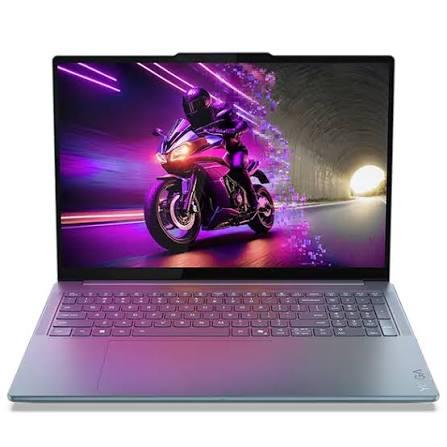
If you've been shopping for a premium 16-inch Windows laptop this year, chances are the Lenovo Yoga Pro 9i has landed on your shortlist. It's one of the few Windows machines that genuinely tries to go toe-to-toe with the MacBook Pro 16 pairing a stunning OLED display, serious Intel horsepower, and a design that feels like it belongs in a design studio rather than a cubicle.
But is it actually worth your money, especially when rivals like the Dell 16 Premium are fighting for the same space? In this guide, we'll break down everything you need to know about the 2026 Lenovo Yoga Pro 9i: its design, display, performance, battery life, ports, and how it compares to the competition so you can decide whether it deserves a spot on your desk.
What Is the Lenovo Yoga Pro 9i?
The Yoga Pro 9i is Lenovo's flagship 16-inch "creator" laptop, sitting at the top of the Yoga Pro lineup above the more affordable Yoga Pro 7i. It's built for people who need real computing power video editors, photographers, developers, and anyone juggling demanding creative software without wanting to carry around a bulky gaming laptop.
For 2026, Lenovo refreshed the Yoga Pro 9i with a new Gen 11 model built around Intel's latest Panther Lake chips. This generation is noticeably slimmer and lighter than its predecessor, measuring roughly 361 x 248 x 17.2mm and starting at around 1.8kg, while still packing a larger battery than before.
Design and Build Quality
Lenovo hasn't reinvented the wheel here, and that's a good thing. The Yoga Pro 9i keeps the same premium all-metal chassis, available in a Thunder Gray finish, with the smooth, rounded edges that have become a signature of Lenovo's upper-tier Yoga laptops.
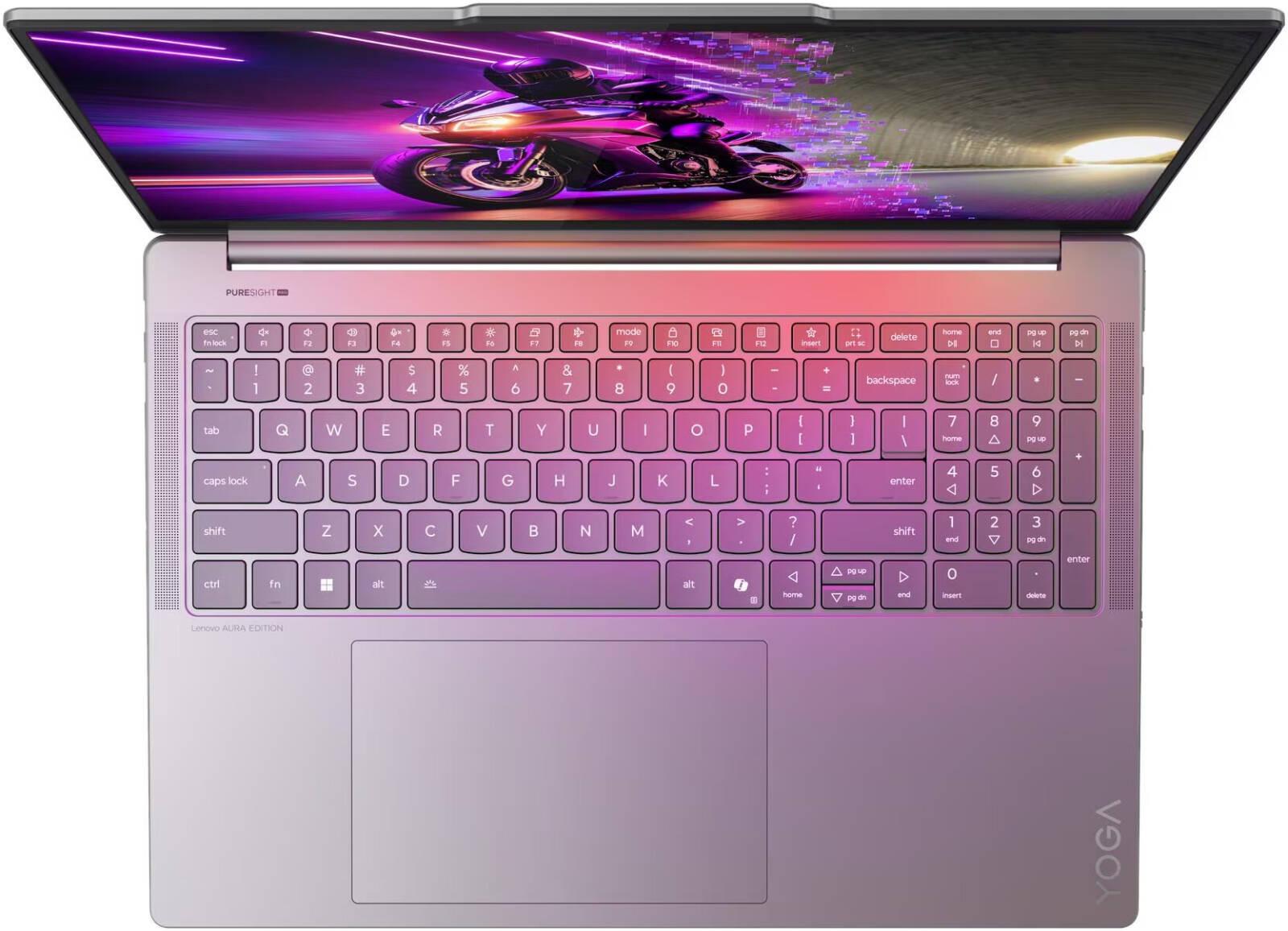
What has changed is the keyboard layout. For 2026, Lenovo dropped the numpad entirely, which centers the keyboard and trackpad under your hands for a more natural typing position. It's a smart move for typing comfort, though spreadsheet-heavy users who relied on quick numeric entry may miss it.
The laptop's cooling system has also been upgraded. Reviewers have noted the 2026 Yoga Pro 9i runs dramatically quieter than earlier generations, reportedly around 20 decibels in Quiet mode, a noticeable drop from the 24–28 decibels of the previous two generations. That's a meaningful improvement if you tend to work in shared spaces like offices, cafes, or classrooms.
Display: The Yoga Pro 9i's Biggest Strength
If there's one reason to consider the Yoga Pro 9i seriously, it's the screen. The laptop is available with two display options:
-
A 16-inch 2.8K (2880 x 1800) OLED panel running at 120Hz with around 500 nits SDR brightness
-
A higher-tier 16-inch 3.2K (3200 x 2000) Tandem OLED panel, also at 120Hz, capable of hitting roughly 1000 nits SDR and even higher in HDR True Black mode
The Tandem OLED technology, which stacks two OLED layers to boost both brightness and panel longevity, is genuinely one of the best displays available on a Windows laptop right now. Colors are vivid and accurate, blacks are deep, and the screen is comfortable to stare at for hours of photo or video work. Independent reviewers have specifically called out the display as a highlight, describing it as detailed and comfortable enough for visually sensitive creative work.
Performance: Panther Lake Power, With Some Caveats
Under the hood, the 2026 Yoga Pro 9i is powered by Intel's Core Ultra 300 series ("Panther Lake") chips, topping out with the Core Ultra 9 386H. That's paired with Nvidia's mid-tier RTX 5000-series graphics configurations, reportedly going up to the RTX 5070 in some markets, though availability varies by region.
In practical terms, this means:
-
Strong CPU performance for programming, audio editing, and general productivity workflows
-
Capable but not class-leading creative performance reviewers note that while the Yoga Pro 9i handles video editing and photo work well, it doesn't lead the pack compared to Apple's MacBook Pro 16 with M5 Pro or M5 Max chips in CPU-heavy tasks
-
Decent but not gaming-laptop-level graphics the RTX 5000-series GPU can run games, but a similarly priced dedicated gaming laptop with a stronger HX-series chip will outperform it
One quirk worth knowing about: some reviewers found that out-of-the-box battery life was underwhelming, but improved significantly once the dedicated GPU was prevented from waking unnecessarily, suggesting this is more of a software optimization issue than a hardware limitation. If battery life is a top priority for you, it's worth checking for the latest driver and BIOS updates before making a final judgment.
Ports and Connectivity
The Yoga Pro 9i offers a solid port selection for a laptop this thin, including a fast UHS-II SD card reader a genuine bonus for photographers and videographers who need quick memory card transfers. Lenovo also offers reasonable internal upgradeability, which isn't always guaranteed on ultra-premium laptops.
The one design compromise: all charging and display-related ports, including Lenovo's proprietary charging port and both Thunderbolt USB-C ports, are clustered on the left side of the laptop. If your desk setup has cables running to the right, you'll need to route them behind the machine a minor but noticeable inconvenience for permanent desk setups.
Audio Quality
Speakers are an easy thing to overlook on a spec sheet, but Lenovo clearly invested here. Reviewers rank the Yoga Pro 9i's speakers among the best of any Windows laptop, putting them on par with the MacBook Pro 16, a genuinely impressive achievement in a category where tinny, thin-sounding speakers are still common.
Lenovo Yoga Pro 9i vs. Dell 16 Premium
The Dell 16 Premium Laptop is one of the Yoga Pro 9i's closest competitors, and the comparison is worth understanding before you buy.
|
Feature |
Lenovo Yoga Pro 9i (2026) |
Dell 16 Premium |
|
Display |
16" 2.8K/3.2K Tandem OLED, up to 1000+ nits |
16.3" OLED, around 353–367 nits |
|
Color Accuracy |
Reported near 100% sRGB, 94.9% Adobe RGB, 100% DCI-P3 |
99.9% sRGB, 89.1% Adobe RGB, 99.7% DCI-P3 |
|
Weight |
~1.8kg |
~2.11kg |
|
CPU |
Intel Core Ultra 9 386H (Panther Lake) |
Intel Core Ultra 7 255H |
|
GPU |
Up to RTX 5070 |
RTX 5060 or RTX 5070 (config-dependent) |
|
Standout Feature |
Brighter Tandem OLED, quieter cooling |
Distinctive design, capacitive touch function row |
|
Notable Drawback |
Ports clustered on one side |
Touch-based function row lacks haptic feedback |
Based on independent testing, the Yoga Pro 9i tends to edge out the Dell 16 Premium on raw screen brightness and color gamut coverage, while the Dell counters with a genuinely striking, ultramodern industrial design inherited from the original Dell XPS line. Both machines are heavier and pricier than mainstream laptops, and both are aimed squarely at creative professionals who want a Windows alternative to Apple's MacBook Pro lineup.
It's also worth noting that Dell has since revived the classic XPS branding, and the Dell 16 Premium's design lineage traces directly back to earlier XPS machines including the compact Dell XPS 13 9350, a laptop that helped define Dell's modern ultraportable design language with its InfinityEdge display and minimalist aluminum chassis. If you've used or researched an XPS 13 9350 before, you'll recognize the same design DNA carried forward into Dell's larger, more powerful 16-inch machines today.
Real-World Use Cases
-
Video editors and photographers will appreciate the color-accurate Tandem OLED display and the fast SD card reader for quick file transfers.
-
Software developers benefit from the strong CPU performance and a keyboard optimized for long typing sessions.
-
Hybrid professionals who split time between video calls, spreadsheets, and creative work will find the Yoga Pro 9i a genuinely capable all-rounder provided they can live without a numpad.
-
Competitive gamers should look elsewhere; while the Yoga Pro 9i can run games, dedicated gaming laptops in the same price range will outperform it.
Pros and Cons
Pros:
-
Outstanding Tandem OLED display with excellent brightness and color accuracy
-
Noticeably quieter cooling system compared to previous generations
-
Slimmer, lighter chassis without sacrificing battery capacity
-
Excellent speakers, among the best on any Windows laptop
-
Fast SD card reader and reasonable internal upgradeability
Cons:
-
Ports are clustered on one side, complicating desk setups
-
Out-of-the-box battery life needs optimization
-
No numpad, which may frustrate spreadsheet-heavy users
-
Not as fast as the MacBook Pro 16 in CPU-heavy creative workloads
-
Not a substitute for a dedicated gaming laptop
Frequently Asked Questions
Is the Lenovo Yoga Pro 9i good for video editing? Yes. Its color-accurate Tandem OLED display and capable Panther Lake processor make it a solid choice for video editing, though it doesn't outperform Apple's MacBook Pro 16 in the most demanding CPU-heavy renders.
How does the Lenovo Yoga Pro 9i compare to the Dell 16 Premium? Both are premium 16-inch creator laptops. The Yoga Pro 9i generally offers a brighter, more color-accurate display and a lighter chassis, while the Dell 16 Premium counters with a distinctive design inherited from Dell's XPS lineage. Your choice may come down to display preferences, port placement, and available configurations in your region.
What CPU and GPU does the 2026 Yoga Pro 9i use? It's powered by Intel's Core Ultra 300 series ("Panther Lake") chips, topping out with the Core Ultra 9 386H, paired with Nvidia RTX 5000-series graphics depending on configuration and region.
Does the Yoga Pro 9i have good battery life? Battery life out of the box has been reported as underwhelming by some reviewers, though it improves significantly when the dedicated GPU is prevented from waking unnecessarily, suggesting future software updates could resolve this.
Is the Lenovo Yoga Pro 9i worth the price? If you want a single premium Windows laptop that handles a bit of everything with an outstanding screen and keyboard, it's a strong contender. If you need maximum CPU performance or serious gaming capability, other machines may serve you better.
Final Verdict
The 2026 Lenovo Yoga Pro 9i is a more refined, more polished machine than its predecessor: lighter, quieter under load, and built around one of the best displays in the entire Windows laptop market. It isn't the fastest option for CPU-heavy creative work, and it won't replace a dedicated gaming laptop, but for professionals who want one versatile, premium machine that handles creative work, everyday productivity, and the occasional game, the Yoga Pro 9i is absolutely worth a serious look, especially against rivals like the Dell 16 Premium.
Have you used the Lenovo Yoga Pro 9i, or are you weighing it against the Dell 16 Premium? Share your thoughts in the comments below, and pass this guide along to anyone shopping for a premium creator laptop this year.

 English
 Arabic
 French
 Spanish
 Portuguese
 Turkish
 Dutch
Dutch
 Italiano
 Russian
 Romaian
 Portuguese (Brazil)
 Greek
Greek