


Dell Precision 5690 Review: Power Meets Portability
Introduction
If you design, render, or code for a living, your laptop is more than a tool it's the thing standing between you and a deadline. That's exactly the gap Dell is trying to close with the Dell Precision 5690, a compact 16-inch mobile workstation built for engineers, creators, and developers who need serious horsepower without lugging around a brick.
In this article, you'll learn what's actually inside the Precision 5690, how it performs in real-world workloads like CAD, video editing, and AI-assisted tasks, where it falls short, and how it stacks up against Dell's own Precision 7780 and the gaming-adjacent Lenovo Legion 9. Whether you're a CAD engineer, a data scientist, or just someone comparing workstation laptops before a big purchase, this guide will help you decide if the 5690 deserves your budget.
What Is the Dell Precision 5690?
The Dell Precision 5690 is part of Dell's Precision line of mobile workstations laptops built specifically for demanding professional workloads rather than everyday browsing or gaming. Dell markets it as its smallest-footprint 16-inch mobile workstation, which tells you exactly what problem it's solving: workstation-class power in a chassis that doesn't feel like carrying a small suitcase.
Unlike consumer laptops, the 5690 is ISV-certified, meaning it's tested and validated to run professional software like AutoCAD, SolidWorks, and Adobe's Creative Suite without the compatibility headaches that sometimes plague standard laptops.
Key Specifications
Here's a breakdown of what you can expect under the hood.
Processor
The Precision 5690 runs on Intel's Core Ultra H-series chips, built on the Meteor Lake architecture. These chips include a built-in Neural Processing Unit that Intel brands AI Boost, and Dell configures them at 45 watts of base processor power rather than the lower 28-watt option available on some H-class chips. Configuration options range from a Core Ultra 5 up through a Core Ultra 9, giving buyers flexibility depending on budget and workload intensity.
Graphics
This is where the 5690 really separates itself from a typical ultrabook. Buyers can choose between integrated Intel Arc graphics for lighter tasks or step up to discrete NVIDIA RTX Ada Generation GPUs options span from an entry-level RTX 1000 Ada all the way to a powerful RTX 5000 Ada with 16GB of dedicated GDDR6 memory. That top-tier GPU is what makes the 5690 genuinely capable for 3D rendering, video editing, and machine learning workflows on the go.
Memory and Storage
The laptop uses soldered LPDDR5-7467 RAM with a maximum capacity of 64GB, paired with two Gen4 M.2 2280 SSD slots for storage. The soldered memory is worth noting — it means you can't upgrade RAM after purchase, so it's worth configuring generously at checkout. Reviewers generally recommend skipping the base 16GB configuration entirely in favor of at least 32GB, since there's no way to add more later.
Display
The 16-inch 4K display is one of the most praised aspects of this machine. It offers vibrant color accuracy suited to creative and design work, and independent testing found 100% sRGB and 98% DCI-P3 color coverage with accurate calibration, along with wide viewing angles and a high maximum brightness of 506 nits.
Build and Portability
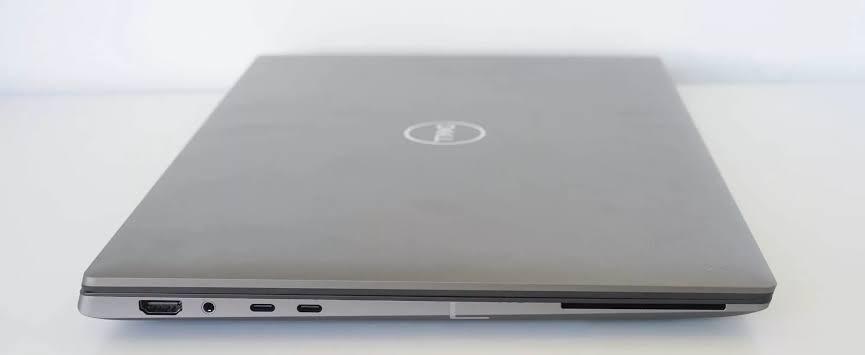
Despite its power, the Precision 5690 is compact and light for a 16-inch workstation, weighing around 2.03 kg with a thickness between roughly 20.5 and 22.2 millimeters. The chassis itself has earned a strong reputation for build quality, with an aluminum exterior that shows minimal flex.
Connectivity
Wireless connectivity comes from an Intel WiFi 7 BE200 card with Bluetooth 5.4, keeping the laptop current on the latest wireless standards. Thunderbolt 4 support also means you can connect high-resolution external displays or a docking station for a desktop-style setup at the office.
Real-World Performance: What Reviewers Found
Independent hands-on testing gives a clearer picture than spec sheets alone.
StorageReview.com's testing found the machine impressively lightweight for its power class, with the RTX 5000 Ada GPU delivering strong capability in such a compact form factor. Interestingly, the reviewers noted the Core Ultra 9 185H processor often didn't show a major performance advantage over the previous-generation Core i9-13900H found in the older Precision 5680, though they expect future software to better leverage the new AI Boost engine over time.
LaptopMedia's review echoed similar praise, highlighting the workstation's compact size, long battery life, comfortable input devices, and standout build quality as major selling points, alongside its impressive display credentials.
Customer feedback collected across Dell's regional storefronts is broadly consistent: buyers frequently praise the Core Ultra processor, dual-GPU graphics setup, and vibrant 4K display for delivering fast performance on demanding workloads, along with solid build quality and long battery life. Some users do flag the laptop's weight and occasional firmware or driver quirks as minor drawbacks, though most reviews describe smooth handling of AI tasks, 3D modeling, and video editing.
Case Study: Who Actually Benefits from This Laptop?
Consider a freelance product designer who splits time between CAD modeling in SolidWorks, photo retouching in Photoshop, and the occasional Premiere Pro edit for client presentations. For this kind of hybrid workload heavy but not constant GPU rendering, combined with day-long portability needs the 5690's combination of a mid-tier RTX Ada GPU, 4K color-accurate display, and sub-2.1 kg weight is close to ideal. It's light enough for client visits yet powerful enough to avoid rendering bottlenecks.
Compare that to a structural engineer running large-scale finite element analysis simulations all day, every day, tethered to a desk. That user is often better served by a larger workstation with more sustained cooling headroom and upgradeable memory which is where the Precision 7780 enters the conversation.
Dell Precision 5690 vs. Dell Precision 7780
Both machines sit in Dell's Precision lineup, but they're built for different priorities.
|
Feature |
Precision 5690 |
Precision 7780 |
|
Screen size |
16-inch |
17.3-inch |
|
Processor |
Intel Core Ultra H-series (Meteor Lake) |
13th Gen Intel Core i9-13950HX vPro, up to 24 cores |
|
Max GPU |
RTX 5000 Ada, 16GB |
RTX 5000 Ada, 16GB GDDR6 |
|
RAM |
Soldered LPDDR5, up to 64GB |
CAMM module DDR5, configurable up to 128GB |
|
Portability |
Compact, ~2.03 kg |
Larger and heavier chassis |
|
Best for |
Mobile professionals, hybrid design/creative work |
Desktop-replacement power users, heavy simulation workloads |
The takeaway: the Dell Precision 7780 wins on portability and modern efficiency-focused processors, while the Precision 7780 wins on raw core count, maximum memory capacity, and sustained performance for the most demanding engineering simulations. If you travel often, the 5690 makes more sense. If your workstation mostly stays on a desk and you need maximum multi-core throughput, the 7780 is the stronger pick.
Where the Lenovo Legion 9 Fits In
It's worth mentioning the Lenovo Legion 9 here too, since it's often cross-shopped by buyers exploring high-performance 16-inch laptops. The Legion 9 is primarily a gaming flagship rather than an ISV-certified workstation, but it shares some DNA with the Precision 5690: a premium 16-inch display, high-end NVIDIA graphics, and a compact-for-its-power chassis. The key difference is certification and driver stability the Precision line is validated specifically for professional software like AutoCAD and SolidWorks, while the Legion 9 is tuned primarily for gaming performance and thermals. If your priority is guaranteed compatibility with engineering or design software, the Precision 5690 remains the safer choice; if gaming performance is equally important to you, the Legion 9 is worth a look.
Pros and Cons
Pros
-
Excellent color-accurate 4K display suited to design work
-
Compact and lightweight for a 16-inch workstation
-
Strong build quality with a rigid aluminum chassis
-
Wide GPU configuration range, up to RTX 5000 Ada
-
Thunderbolt 4 and WiFi 7 for future-proof connectivity
-
Long battery life reported by reviewers and customers alike
Cons
-
Soldered RAM means no post-purchase upgrades
-
High-end configurations get expensive quickly
-
CPU gains over the previous generation are modest in some workloads
-
Occasional firmware and driver quirks reported by users
Frequently Asked Questions
Is the Dell Precision 5690 good for gaming? It can handle games reasonably well thanks to its NVIDIA RTX Ada graphics, but it's not designed or marketed as a gaming laptop. If gaming is your primary use case, a dedicated gaming laptop will offer better value.
How much RAM should I get since it's not upgradeable? Most reviewers recommend at least 32GB, especially if you plan to run CAD software, virtual machines, or multiple creative applications simultaneously.
Is the Precision 5690 worth it over the Precision 7780? It depends on your priorities. Choose the 5690 for portability and a modern efficiency-focused processor. Choose the 7780 if you need maximum cores, more RAM headroom, and don't mind a larger chassis.
Does it support external monitors? Yes. Thunderbolt 4 ports support high-resolution external displays and docking stations, making it easy to build a desktop-style setup when you're back at your workstation.
Conclusion
The Dell Precision 5690 succeeds at a genuinely difficult balancing act: delivering true workstation-class performance in a chassis that doesn't punish you for carrying it around all day. Its 4K display, flexible GPU options, and solid build quality make it a strong choice for designers, engineers, and creative professionals who need power on the move. Just go in with eyes open about the non-upgradeable RAM, and configure generously from day one.
If your workload leans toward heavier, sustained simulation work, it's worth cross-shopping the Precision 7780 before you buy. And if gaming performance matters just as much as professional software compatibility, take a look at the Lenovo Legion 9 too.
Have you used the Dell Precision 5690 for your own work? Share your experience in the comments below, or pass this guide along to a colleague who's shopping for a new workstation your feedback helps other professionals make a smarter buying decision.

 English
 Arabic
 French
 Spanish
 Portuguese
 Deutsch
 Turkish
 Dutch
Dutch
 Italiano
 Russian
 Romaian
 Greek
Greek